Perfect Fit Clothing: Visualize Your Perfect Style in Seconds
I've been there. You spot the perfect dress online, and instantly, your imagination takes over. You picture exactly where you’ll wear it, how amazing you’ll feel. You add to cart, hit "buy," and then... the wait begins.
That initial thrill of the purchase slowly morphs into a quiet dread. "Will it actually look like that on me?" It's the universal question that haunts every online shopper.
This endless cycle of buying, trying on, and inevitably returning is more than just a hassle—it's a massive drain on your time, money, and frankly, your confidence. You start to think that visualizing your perfect fit clothing online is a myth.
It's About More Than Just Measurements
Here’s the thing: knowing your bust, waist, and hip measurements is a fantastic starting point, but it only tells half the story. A tape measure can’t predict how a silky fabric will drape, how a specific cut will flatter your curves, or how a bold pattern will vibe with your personal style.
The real breakthrough happens when you stop obsessing over size charts and start focusing on visual discovery. For those who want the absolute pinnacle of fit, understanding bespoke tailoring, the art of a perfect fit is key. That principle—of crafting something specifically for an individual—is now, thanks to some clever tech, becoming something I can tap into.
A New Way to See Yourself in Style
What if you could close that gap between the slick product photo and your own reflection in the mirror? This is where I found an absolute game-changer. I stumbled upon the TryThisFit app, a tool that lets me see how clothes will look on my own photo in seconds. It’s not about whether a size will be right; it’s about seeing if the style of that dress is actually the look I'm after.
By previewing the appearance of an item first, you transform shopping from a guessing game into a creative process of style discovery. You can finally explore bold new looks with confidence.
This simple shift has brought all the fun back to online shopping for me. I can see how a new top from Zara, a pair of jeans from H&M, or even a vintage find on Vinted will look before I commit. I'm no longer crossing my fingers; I'm actively building a wardrobe I genuinely love. Try it now at trythisfit.com and see what I mean.
Master Your Measurements and Decode Size Charts
Alright, let's talk about the secret weapon to winning at online shopping: knowing your measurements. This isn't about chasing some "perfect" number or comparing yourself to a size chart. Honestly, it's about empowerment. Grabbing a few key numbers gives you the data you need to shop with total confidence.
You don’t need any fancy gadgets. A simple, flexible tape measure is perfect, but even a piece of string and a ruler will get the job done. The goal here is to get a personal baseline—your unique starting point for figuring out what will actually flatter you.
The big three measurements you'll want are your bust, waist, and hips. Think of these as your personal style coordinates. They're the most critical data points for predicting how a garment will drape on your body, long before you click "add to cart."
How to Take Basic Measurements
Getting your numbers is way easier than you might think. Just stand up straight, relax, and breathe normally. For the most accurate read, measure right up against your skin or over a thin, snug layer like a camisole or leggings.
- Bust: Wrap the tape around the fullest part of your chest. Make sure the tape is level all the way around your back. It should be snug, but not tight enough to squish you.
- Waist: To find your natural waist, bend to one side. See that little crease? That's the spot! Wrap the tape measure around that point.
- Hips: Stand with your feet close together and measure around the widest point of your hips and bum. This is key to making sure pants and skirts have enough room.
If you want a super detailed walkthrough, our guide on how to take accurate body measurements will make you a pro in no time. Getting these numbers right is the first step to breaking free from the dreaded online shopping gamble.
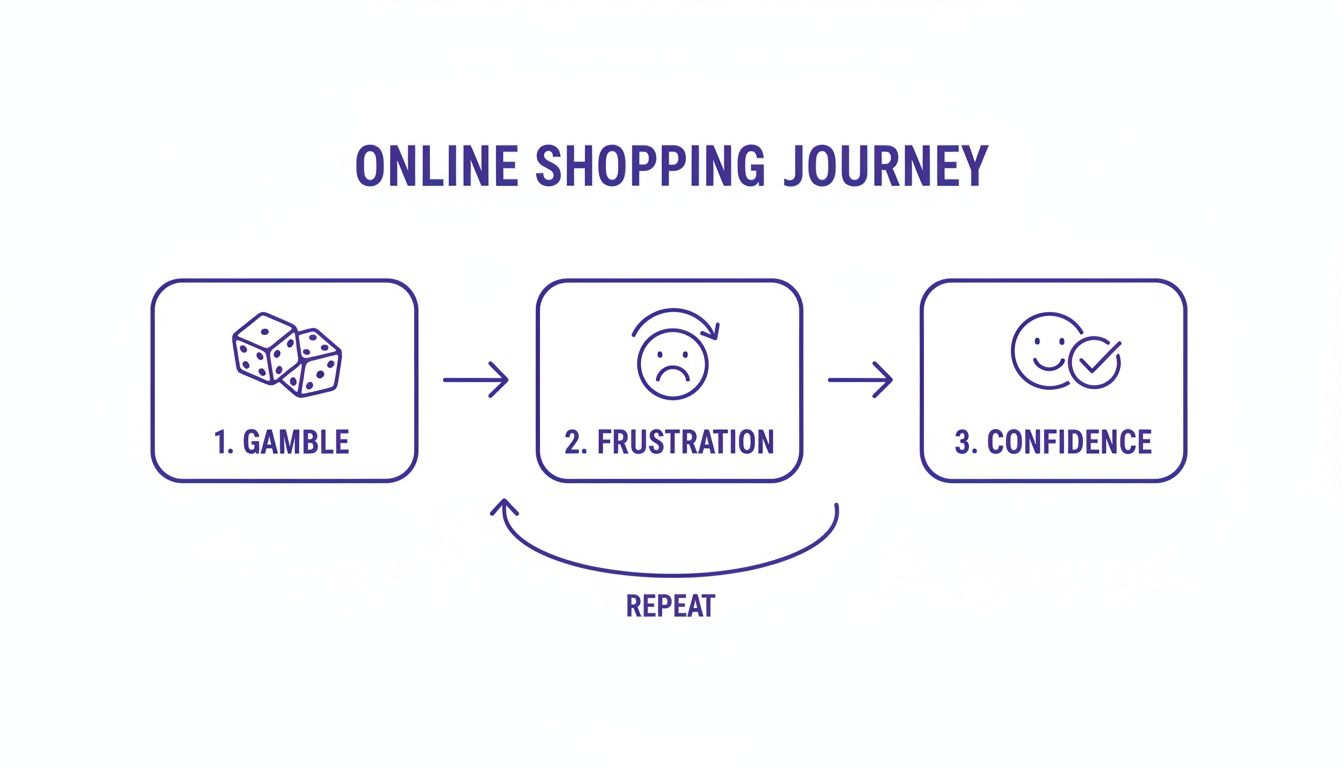
This is the all-too-familiar cycle, right? But with the right approach, I can skip right past that frustration loop and land squarely in "Confidence" every single time.
Making Sense of Fit Terminology
Now, your measurements are only half the story. The other half is cracking the code of what brands actually mean when they throw around terms like "relaxed fit" or "oversized." These aren't just trendy words; they're vital clues about the garment's intended silhouette and style.
Think of fit terms as a secret language. Once you're fluent, you can look beyond the numbers on a size chart and truly picture how an item is supposed to look and feel.
One brand’s "slim fit" can feel completely different from another's, so understanding the intention behind the design is everything. Here’s a quick reference guide to help you translate these common descriptions.
Decoding Clothing Fit Terminology
| Fit Term | What It Means for the Style | Best For Visualizing |
|---|---|---|
| Slim Fit | Cut close to the body, creating a sleek, contoured silhouette. | Seeing how a garment highlights your natural shape. |
| Relaxed Fit | Drapes loosely for a comfortable, casual, and easygoing appearance. | How an item creates a casual, flowing look. |
| Oversized | Intentionally designed to be much larger for a bold, fashion-forward statement. | The dramatic and trendy effect of extra volume. |
Instead of getting bogged down by the numbers, use these terms to guide your imagination. An oversized blazer is designed to be roomy and dramatic. So, instead of worrying if it's technically "too big," you can focus on the real question: "Do I love this bold silhouette on me?"
Combining this knowledge with a tool that lets me actually see the style on my body is my ticket to finding clothes I’ll absolutely adore.
Visualize Any Outfit Instantly with Virtual Try-On
Okay, so you've nailed your measurements and you can now decipher a size chart like a pro. That's a huge step. But what if you could just skip the guesswork altogether and see how a new dress or top actually looks on your body? This is where the magic happens, and it's a trick that has completely transformed how I shop online.
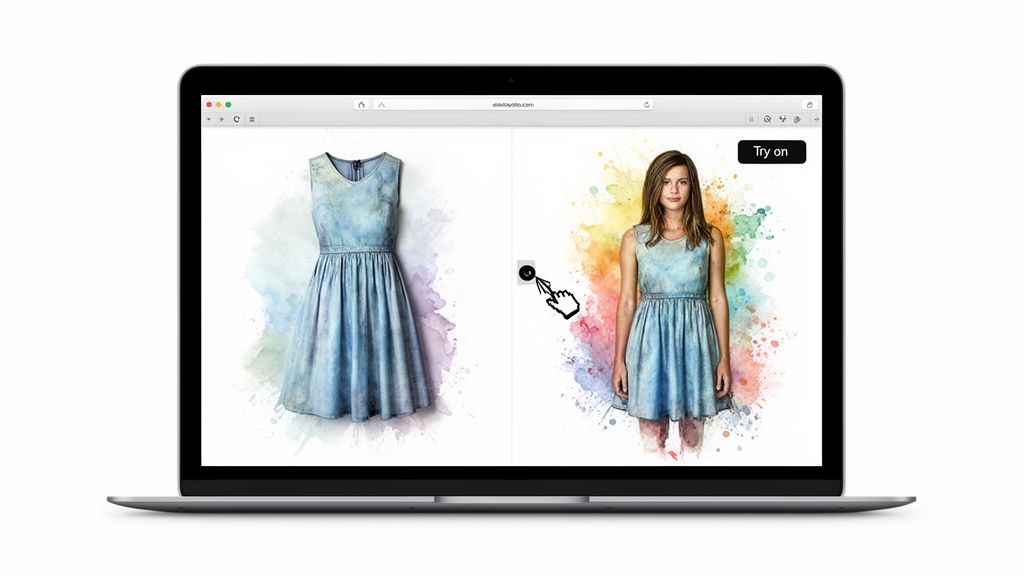
I stumbled upon this amazing tool called TryThisFit that lets me preview the style of literally any piece of clothing on a photo of myself. This isn't about getting the size right—it's pure style visualization. For the first time, I can answer the question, "Is this style even me?" before I ever click "add to cart."
How to Preview Styles in Seconds
The best part? It's ridiculously fast and easy. The app has a free Chrome extension that’s a total game-changer. Once it's installed (which takes all of two seconds), I can browse any online store I want. When shopping sites like Zara, H&M, or even Vinted, I just right-click on a clothing image, and boom—I instantly see what it looks like on my own picture.
This simple little trick has saved me so much hassle. Let's be real, online returns are a nightmare. In 2023 alone, they created an $84 billion problem for retailers, mostly because we're all just guessing. (If you're a numbers geek like me, you can find more wild apparel statistics from Market.us.) By previewing styles first, I sidestep that entire cycle.
The goal isn’t to find perfect fit clothing based on a size tag, but to discover styles that make you feel amazing. A virtual preview is my secret weapon for confident shopping.
This gives you total freedom to play around. Have you ever been curious about a wild color or a super trendy silhouette but felt too nervous to commit? Now you can see how it looks without any risk. It's like having an endless dressing room on your laptop. If you're curious about the tech behind it, you can learn more about how virtual try-on technology is making this all possible.
Getting the Best Visual Results
I've played around with this a lot, and I've found one crucial tip for getting the most accurate preview: flat-lay clothing photos work best. When an item is laid out flat on a simple background, the app can see its true shape and how it’s meant to hang. This gives you a much more accurate idea of the style.
Here’s my go-to process when I start shopping:
- First, I upload a clear, full-body photo of myself to the app. A simple background is key!
- Then, I head to my favorite stores, whether it's Amazon, ASOS, or Shein.
- When a piece catches my eye, I just right-click the image and let the extension do its thing.
- The try-on pops up immediately. I can even save my favorites to my history to compare different looks side-by-side.
Seriously, it’s that easy. You don't need an account, and it works on pretty much any website. This is the ultimate tool for visual people who want to build a wardrobe they genuinely love. You can get a closer look at the virtual try-on process on the site. Ready to try it for yourself? Install the Chrome extension in a couple of seconds and start exploring.
Alright, you've got the basics down. Now for the fun part! Let's talk about how to apply these skills to the stores you actually love to shop at. I'm going to show you exactly how I navigate my favorite sites, turning what can be a frustrating guessing game into a total win. My secret weapon? The TryThisFit Chrome extension.
Honestly, huge sites like Amazon used to overwhelm me completely. Millions of options! My go-to strategy now is to open a bunch of tabs with different dresses or tops I'm considering. Then, I use the extension to right-click and instantly see each one on my own photo. This lets me do a rapid-fire, side-by-side comparison to find what I like.
Visualizing Styles on Fast Fashion and Secondhand Sites
Now, let's talk about trendy spots like Zara and H&M. Their model photos are stunning, but it's hard to guess how a piece will look in real life. This is where a virtual preview is an absolute lifesaver. I can grab that cool blazer or bold dress and, in a click, see how the cut and color actually work on my body. It helps me see past the marketing and decide if the style is genuinely me.
This is even more critical for secondhand treasure troves like Vinted or Depop. You can find incredible, one-of-a-kind items on these platforms. But there are no try-ons, and almost always, no returns. That risk alone stops so many people from scoring amazing finds.
A virtual preview is your new best friend for secondhand shopping. It gives you that boost of confidence to finally hit 'buy' on a vintage gem because you've already seen how fantastic it's going to look.

Seeing how a style from Zara could look on you before buying is a total game-changer. For an even deeper dive into making smart choices, you can explore our guide on how to shop for clothes online.
Unlocking Your Style on Any Website
Here’s the best part: this approach works everywhere. Because the TryThisFit Chrome extension is activated with a simple right-click, it works on literally any website where you can find a photo of a piece of clothing. You are not stuck with just the major retailers.
This means you can "try on" looks from tiny indie boutiques, explore costume shops like for Halloween, or browse your favorite niche brands with total confidence. No matter where my shopping adventures take me, I have the power to instantly see how a style fits into my world.
It’s all about making the process more visual and way more intuitive. You're no longer just crunching numbers from a size chart; you're actually connecting with the clothes. This simple shift is how you build a wardrobe packed with pieces you truly love. Ready to see for yourself? Install the Chrome extension in a couple of seconds and watch how it transforms your online shopping.
So, What If It’s Not Quite Perfect?
Let’s be real—even after all your careful prep work, that moment of truth when you unbox a new purchase can be a nail-biter. Sometimes, an item arrives and just doesn't hit the same way it did on your screen. It happens! But it doesn’t have to be a frustrating dead end.
If this has happened to you, know that you’re not alone. A staggering 60% of women around the world say they struggle to find clothes that actually fit their unique body shapes. This is a huge gap in the fashion industry, and it’s why being able to visualize your style before you buy is so powerful. You can see for yourself how big the challenge is in the plus-size market, which sheds light on the broader issue.
A Few Quick Fixes I Swear By
Okay, so the item is almost there but needs a little something extra. Before you even think about a return, you’ve got options that don’t require a sewing machine. These are my absolute go-to tricks for tweaking how a garment hangs.
- Fashion Tape is Your Best Friend: This double-sided magic tape can fix a gaping neckline, tame a wild lapel, or keep a pesky bra strap hidden. It’s totally invisible and gives you instant control.
- Hemming Tape for Instant Length Adjustments: Got pants or a skirt that are just a touch too long for your favorite shoes? Iron-on hemming tape creates a super clean, no-sew hem in minutes. It’s a game-changer.
These tiny adjustments are all about perfecting the drape and silhouette—the details that create that amazing feeling of perfect fit clothing. Sometimes a five-minute fix is all it takes to transform a piece from "meh" to "made for me."
Don't Fear the Return Label!
When a quick fix isn't going to cut it, it's time to embrace the return policy. Seriously, don't look at it as a failure! A strategic return is just another tool in your smart shopping toolkit. My rule is to always keep the original tags and packaging until I'm 100% sold on an item.
By visualizing outfits with a tool like the TryThisFit app before buying, you can dramatically cut down on the need for returns in the first place, saving you time and hassle.
Of course, the best return is the one you never have to make. Getting a virtual sneak peek of how an outfit will actually look on you is the ultimate strategy. By using the free Chrome extension from trythisfit.com, you can see that dress from Zara or that top from Amazon on your own photo, which is the best way to dodge that post-purchase disappointment. Try it now at trythisfit.com and give yourself the power to shop with total confidence.
Answering Your Top Virtual Try-On Questions
So, you’re curious about virtual try-on! I get so many questions about how this technology actually works and how to get the most out of it. It’s a completely new way to shop, and honestly, it’s a total game-changer once you get the hang of it. Let's dive into the questions I hear most often.
Think of this as your personal style playground. It’s all about visualizing an outfit and discovering what you truly love, taking the guesswork out of "Will this even look good on me?" When you know how to use it right, online shopping becomes this fun, creative, and confidence-boosting adventure.
What Kinds of Clothes Work Best?
This app is fantastic for a huge variety of styles! I use it for everything from dresses and tops to jackets and even entire outfits. But I've found a secret to getting the most accurate preview: always look for flat-lay clothing photos.
When an item is laid out flat, the app can really "see" its true shape and silhouette. This gives you a much better sense of how the fabric is meant to hang and drape, which is exactly what you need to see if the overall style is right for you. It's a simple trick that makes a big difference.
How Do I Take the Perfect Photo of Myself?
For an amazing style preview, you need a great photo of yourself to start with. The key is a clear, full-body shot. Just stand up straight with a simple, uncluttered background behind you—good, even lighting is your best friend here!
My biggest tip? Wear something form-fitting for your photo, like leggings and a tank top. This creates a kind of "blank canvas" so the virtual clothes can layer over your shape without any weird bumps or distractions. It helps you see exactly how different cuts and styles will actually look on your body.
Remember, the goal here is all about previewing the style, not checking the exact sizing. A solid base photo makes it so much easier to tell if that boxy jacket or flowy dress is a look you'll absolutely love.
Can I Use This for More Than Just Shopping?
Oh, absolutely! This is one of my favorite parts. I use the app for all kinds of style planning, way beyond just deciding what to wear. It has been a total lifesaver for seeing how a Halloween costume will come together before I buy the pieces, or for deciding between two dress options for a friend's wedding.
Because it works with literally any photo you find online, the possibilities are endless. Just find a picture of an item you're curious about—it could be from Amazon, a specialty costume shop, or a high-end boutique—and use the Chrome extension to right-click and see it on yourself. It's the perfect way to explore those bold looks you might be a little hesitant to buy blindly. Plus, you can always go back and look at your saved styles in your history.
Ready to stop guessing and start seeing what you'll look amazing in? It's so much fun to finally visualize your next favorite outfit. You can jump in right now with TryThisFit at trythisfit.com or install the free Chrome extension in just a couple of seconds.
Try Virtual Try-On Now
See how clothes look on you before you buy - works with any online store
Get Started Free