Best Closet App to Visualize Your Style Instantly
You’ve probably done this recently. One tab has a Zara blazer, another has a Vinted vintage skirt, another has an Amazon sweater, and your cart is full of pieces that looked amazing on the model but still feel like a gamble on you.
That’s why the search for the best closet app isn’t really about organizing clothes anymore. It’s about seeing how a style looks before you commit, so shopping feels less like guesswork and more like getting dressed with a visual cheat code.
The End of "Will This Even Look Good On Me"
Online shopping used to feel fun right up until the decision point. Browsing was easy. Buying was the hard part.
A dress might be gorgeous in the product photo, but your real question isn’t whether it exists. Your real question is whether it works with your style, your usual outfits, and the version of yourself you want to dress.
That tension shows up everywhere. It’s especially obvious with items that have strong visual character, like embroidered pieces, dramatic jackets, or trend-heavy dresses. If you’ve ever hesitated over this common styling dilemma, you already know the feeling. A beautiful piece can still leave you wondering how it will look in your world, not just on a styled model.
Closet apps step into that exact moment of doubt. Instead of asking you to imagine the outfit in your head, they help you see how it looks, which is a much easier way to decide.
Shopping gets better when you stop asking “Should I buy this?” first, and start by asking “Do I like how this style looks on me?”
That shift matters because online fashion shopping is huge, and returns are part of the problem. Online clothing sales often see 30-40% return rates, often tied to style and appearance mismatches, and global online fashion sales are projected to reach $1.2 trillion by 2027 according to digital wardrobe management statistics.
A good closet app closes that gap between browsing and confidence. It turns the whole process into something more visual, more creative, and much less annoying.
What to Look for in a Virtual Closet App
A lot of guides treat every closet app like it does the same job. It doesn’t. Some are better for outfit planning, some are stronger on sustainability, and some are much better at connecting directly to the places you already shop.
That’s why picking the best closet app starts with knowing what matters to you. Reviews often rank different apps highly for different strengths, which is why feature fit matters more than a generic top-ten list.
Start with the kind of visual help you want
The first question is simple. Do you want an app that mostly helps you organize what you own, or one that helps you preview how new items might look with your style?
Those are related, but they’re not the same experience.
If your biggest pain point is standing in front of your wardrobe feeling uninspired, a planning-focused app may be enough. If your biggest pain point is online shopping hesitation, then visualization matters more.
Here’s a quick way to tell the difference:
| What you need | What to prioritize |
|---|---|
| Daily outfit planning | Closet organization, saved looks, style history |
| Online shopping confidence | Fast try-on previews, retailer integration, easy image use |
| Resale and secondhand browsing | Quick previews from marketplace listings |
| Simpler dressing habits | Tools that support a capsule wardrobe mindset |
Check visualization quality, not sizing promises
Often, readers get confused. A strong virtual closet app should help you visualize the style, not promise perfect sizing answers.
The useful question isn’t “Will this fit down to the inch?” It’s “Can I see the drape, color, silhouette, and overall vibe clearly enough to decide whether I like it?”
Look for tools that make the clothing item easy to isolate and preview cleanly. The clearer the garment image, the easier it is to judge the appearance.
Practical rule: If an app talks more about showing you the look than predicting your exact size, that’s usually a healthier sign.
Friction matters more than most people expect
People quit fashion tools when the setup feels like homework. If adding one top takes too many steps, most shoppers won’t keep doing it.
Ease of use usually comes down to a few things:
- Fast input: Can you use a product image quickly, or do you have to download, crop, upload, and tag everything manually?
- Low commitment: Can you try it without a long signup flow?
- Natural workflow: Does it work while you’re already browsing Zara, H&M, Amazon, or resale sites?
An app can be stylish and clever, but if it interrupts your shopping rhythm, it won’t become part of your routine.
Privacy should feel clear, not mysterious
You’re often working with personal photos. That makes privacy feel less like a feature and more like the baseline.
A good rule is to favor tools that explain the photo flow in plain language. If something feels vague, overcomplicated, or overly salesy, trust that instinct.
Integration beats isolation
The best tool usually isn’t the one asking you to rebuild your whole wardrobe system from scratch. It’s the one that slides into your existing habits.
That’s why shopping-site integration matters so much. If you browse from multiple stores, your closet app should keep up with that reality instead of forcing everything into one closed environment.
New Ways to Shop and Style
A closet app earns its place when it helps you make decisions, not just store screenshots. Its true value shows up while you shop online, compare options, and test ideas that are still sitting in your cart.

A good way to choose a closet app is to start with your shopping habits. The right fit for a Zara browser is not always the right fit for a secondhand hunter or someone building a themed outfit from five different sites. That is the part many roundups skip. They list features. You need a tool that matches how you shop.
If you shop fast from major retailers
You have tabs open from Zara, H&M, and maybe Amazon. A trench coat looks promising. So do two knit dresses and a pair of wide-leg pants. After a few minutes, every product page starts to melt together.
At that point, inspiration is not the problem. Visual filtering is.
A virtual closet app helps you compare pieces in a more personal way, so you can sort out what feels polished, too formal, too plain, or right for your closet. It turns online shopping into something closer to trying hangers against yourself in a fitting room, except you are doing it from your screen.
If you live on resale apps
Secondhand shopping has a different challenge. The best piece might be photographed on a chair, under yellow light, or half folded on a bed. You are not just judging the item. You are decoding the listing.
That is where a style preview helps. You can look past the messy photo and focus on the shape, color, and overall vibe. For non-returnable finds, that matters a lot. You are not checking exact fit. You are asking a smarter question first. Does this still look like something I would reach for?
Resale shopping gets easier when you can judge the style of a piece without depending on a stranger's camera skills.
If you build outfits across multiple sites
Event dressing is its own category. Halloween looks, themed parties, vacation outfits, wedding guest backups. These outfits rarely come from one store, and most stores only show you their version of the full look.
A closet app lets you pull ideas together visually. A cape from one shop, boots from another, accessories from a marketplace listing. Suddenly the outfit stops living in your head and starts looking real enough to edit.
If you are curious how a browser-based tool works while you shop, this quick guide explains what a Chrome extension does.
Here is the simplest way to match the tool to the job:
- For big retail sites: Choose a closet app that helps you compare several product-page options quickly.
- For secondhand shopping: Prioritize clear try-on previews that help messy listings make sense.
- For event or costume planning: Look for a tool that makes it easy to mix pieces from different stores into one visual outfit.
The best closet app is not just the one with the longest feature list. It is the one that fits your shopping pattern and helps you see your choices more clearly before you buy.
Visualize Any Outfit Instantly with a Browser Extension
You are halfway through a late-night shopping spiral. One tab has a Zara coat, another has boots from a resale listing, and a third has a random boutique top you did not plan to love. The hard part is no longer finding clothes. It is seeing them as an outfit before you buy.
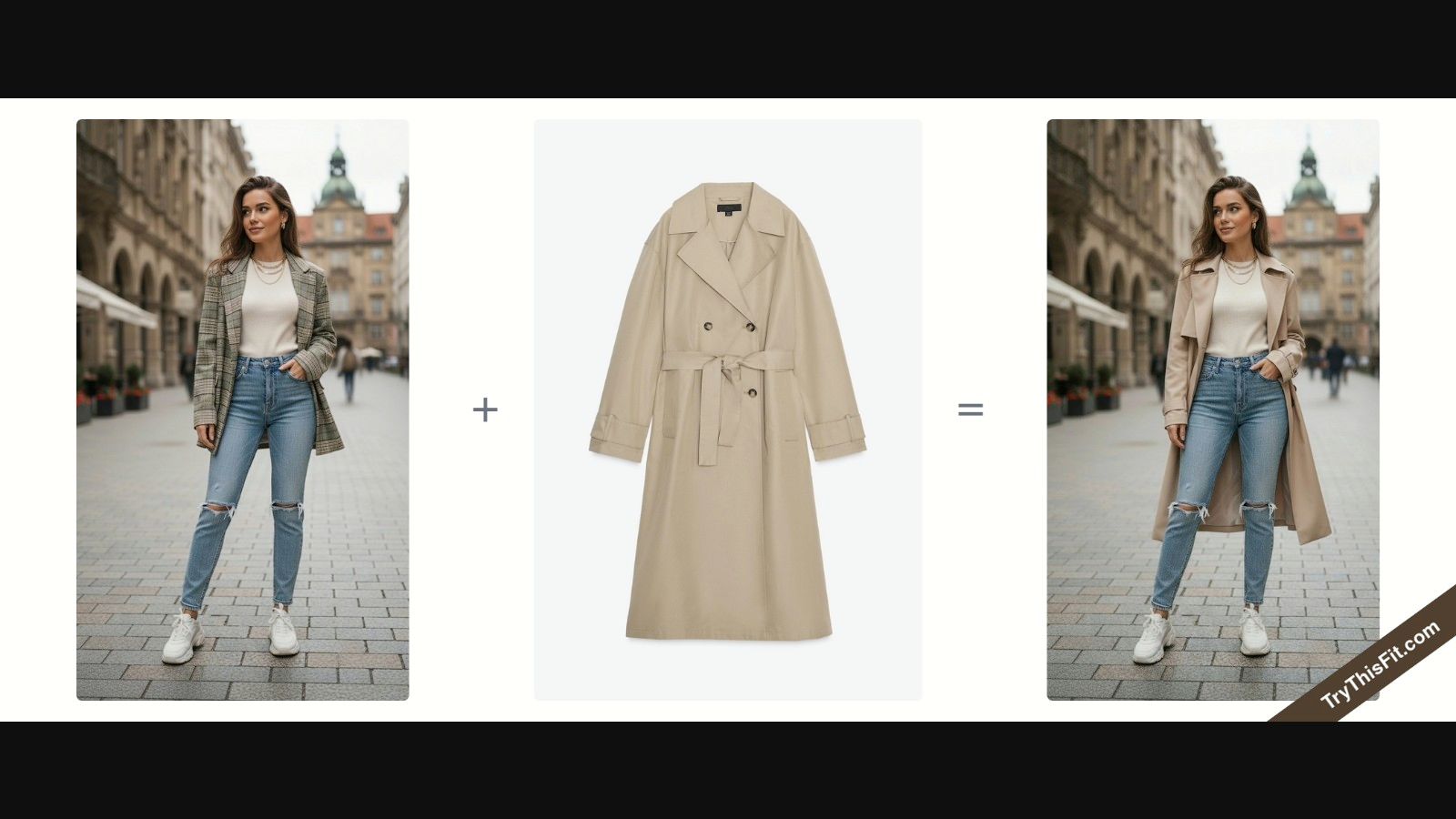
A browser extension helps because it works inside the shopping flow you already have. Instead of saving screenshots, downloading product photos, and bouncing between apps, you can test a piece while you are still looking at the product page. That changes a closet app from a separate project into a shopping tool you will use.
Why the right-click flow feels easier
A lot of virtual closet tools ask you to stop shopping and start organizing. A browser extension keeps the momentum going. You stay on Zara, H&M, Amazon, Shein, Vinted, or a smaller shop, then send the product image straight into a try-on preview.
If you have never used one before, this quick guide on what a Chrome extension is explains the idea clearly.
The flow is simple:
- Install the extension: It takes a moment to add it to Chrome.
- Open any clothing site: You can keep browsing the stores and marketplaces you already use.
- Right-click the product image: That sends the item into the try-on flow.
- Preview the look: You can check the overall style on your photo within seconds.
Why this setup matters
A key advantage is flexibility.
Most closet apps work best if your style life stays inside one platform. Real shopping rarely works that way. You might buy basics from a big retailer, hunt for bags on resale sites, and find occasion pieces from smaller brands. A browser extension matches that reality because it travels with you from tab to tab.
TryThisFit is one example of that approach. It lets you upload a photo and create try-ons from product images while you browse, which makes it useful for shoppers who want quick visual checks instead of a long setup process.
A helpful closet app does not need to become your whole fashion universe. It needs to fit into the way you already shop and make your choices easier to see.
A quick demo helps make the workflow click:
<iframe width="100%" style="aspect-ratio: 16 / 9;" src="https://www.youtube.com/embed/kba3W4-S7aE" frameborder="0" allow="autoplay; encrypted-media" allowfullscreen></iframe>Where a browser extension shines
This approach is especially useful in a few situations:
- Trend checking: See whether a bold piece still feels like you before it lands in your cart.
- Side-by-side comparisons: Test similar coats, dresses, or tops without breaking your browsing rhythm.
- Secondhand shopping: Use the actual listing photo to get a clearer read on style potential.
- Multi-store outfit planning: Pull pieces from different shops into one visual decision instead of guessing in your head.
That is the unique advantage here. You are not choosing a closet app only by feature list. You are choosing based on how you shop, and a browser extension often makes the most sense if your wardrobe decisions happen across the whole web.
Tips for Getting the Perfect Style Preview
The quality of your preview depends a lot on the images you use. The good news is that you don’t need a studio setup. You just need a few clean habits.
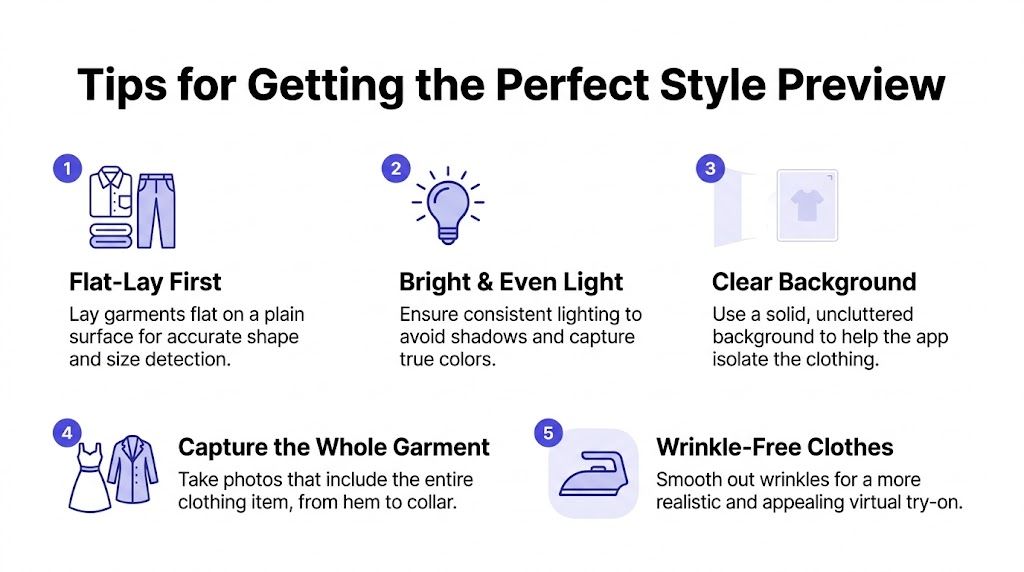
Flat-lay photos usually work best
If you want the most accurate style preview, flat-lay clothing photos are usually the safest choice. That means laying the garment flat on a plain surface and photographing the full item clearly.
Why does that help? Because the app can read the shape, edges, and visual structure of the garment more cleanly when the item isn’t bunched up, folded awkwardly, or half hidden on a hanger.
Small photo tweaks make a big difference
A few simple choices improve results right away:
- Use even lighting: Soft, bright light makes color and detail easier to read.
- Choose a plain background: A clear surface helps the clothing stand out.
- Show the whole item: Don’t crop off sleeves, hems, or the neckline.
- Smooth wrinkles when possible: Cleaner lines make the preview look better.
For your own photo, keep it straightforward. A clear front-facing image with decent lighting tends to work best for visualizing outfit appearance.
Clean images don’t just look nicer. They make the clothing easier to preview accurately.
If you’re curious about prep details for your own photo, this guide on how to take accurate body measurements can still be useful for general wardrobe planning, even though style preview tools focus on how clothes look rather than guaranteeing size outcomes.
If you’d rather test the experience before using your own images, you can start with sample photos at TryThisFit.
Build Your Personal Style History
One of the smartest parts of a digital closet isn’t the first try-on. It’s the fifth, the fifteenth, and the one you revisit three weeks later.
When your try-ons are saved, you start building a visual record of your taste. That’s different from a random folder of screenshots. It becomes a style journal.
Your saved looks teach you what you actually like
You may think you’re drawn to one aesthetic, but your saved try-ons often tell a more honest story. Maybe you keep choosing structured coats, softer neutrals, or bolder silhouettes than you wear in real life.
That kind of pattern is useful. It helps answer “what should I wear?” with evidence instead of mood.
A saved history also makes it easier to shop your closet. When you can see the outfits and clothing directions you already liked, you’re less likely to keep chasing duplicate purchases that don’t add anything new.
A closet app becomes more valuable over time
This is why a visual history matters so much. The more looks you save, the easier it becomes to notice repeat winners and skip weak buys.
If you want that running record, the saved try-on history at your style history page gives you one place to review past outfit previews and compare ideas over time.
Common Questions About Virtual Try-On Apps
A few questions come up every time someone tries this type of tool for the first time. Here are the answers that matter most.
Is my data private and are my photos safe
Privacy matters more here than in a lot of other shopping tools because you’re often using personal images. A privacy-first tool should be clear about what it does and not bury the basics under vague language.
TryThisFit is built by a solo founder, and the stated approach is that user data isn’t sold. That kind of simple, direct positioning is worth looking for in any app you use.
Does this work on mobile devices
Some closet tools are app-first. Others are more useful on desktop because the browser workflow is the whole point.
If your shopping happens mostly in Chrome on a laptop, the extension route feels especially smooth. If you’re on mobile, a web app can still be useful for trying items and viewing saved looks, but the right-click extension experience is naturally desktop-centered.
Does a virtual closet app tell me my size
No. This is the biggest misconception.
A virtual try-on app helps you see how it looks, visualize the style, and preview the appearance of an item. It doesn’t replace brand size charts, garment measurements, or your own judgment about fit.
That’s the healthiest way to use it. Let size information come from the retailer and your normal shopping checks. Let the app answer the visual question.
Is it hard to get started
It doesn’t have to be. The easiest tools let you begin with a simple upload or use a product image directly from the page you’re browsing.
If you’re the kind of shopper who hates setup, start small. Try one coat, one dress, or one resale listing. Once you see the preview, the value becomes obvious fast.
Discover your next favorite outfit at TryThisFit. You can try clothes from the main app, explore saved looks in your history, or install the Chrome extension and preview styles from the stores you already browse in seconds.
Try Virtual Try-On Now
See how clothes look on you before you buy - works with any online store
Get Started Free