What Is a Chrome Extension and How Do They Work?
Ever find yourself thinking, "I wish my browser could just..."? Well, there's a good chance it can. That's where Chrome extensions come in. Think of them as mini-apps that live right inside your browser, giving it superpowers to make your online life easier, more productive, and way more fun.
So, What Exactly Is a Browser Power-Up?
At its heart, a Chrome extension is a small software program built to add specific features and functions directly into Google Chrome. They aren't standalone programs you run from your desktop; instead, they seamlessly blend into your browser.
This tight integration is what makes them so handy. They can interact with the websites you visit, add new buttons to your toolbar, or just quietly work in the background. For instance, some extensions let you save articles, while others, like the TryThisFit Chrome extension, completely change how you can visualize fashion online.
To put it simply, here are the core ideas:
Chrome Extensions at a Glance
| Characteristic | Simple Explanation |
|---|---|
| Integration | They work inside Chrome, not as separate apps. |
| Purpose | Designed to solve a specific problem or add a single function. |
| Lightweight | Small and simple, so they don't slow your browser down. |
| Accessibility | Easily installed (and uninstalled) from the Chrome Web Store. |
These little tools pack a big punch by focusing on doing one or two things really, really well.
From Niche Helpers to Global Game-Changers
The sheer variety of extensions is mind-boggling. The Chrome Web Store is home to over 111,000 of them, and what's really fascinating is how they serve different needs.
A whopping 86.3% of these extensions have fewer than 1,000 users. This shows just how many are built to solve very specific, personal problems for a small group of people. At the same time, you have giants that are used by millions every day. You can dive deeper into these Chrome statistics to see the full picture.
The real magic of an extension is its ability to fix that one little annoyance you face every day. Whether it's grabbing a screenshot, managing passwords, or seeing how a new outfit might look, there’s probably an extension for that.
Ready to see what I mean? You can install the Chrome extension for TryThisFit in just a couple of seconds and instantly start previewing styles from your favorite online stores.
How Chrome Extensions Work Their Magic
So, how do these handy little tools actually pull off what they do? It's not as complex as you might think. Imagine a Chrome extension as a tiny, focused program built with the exact same stuff that makes up websites: HTML for the skeleton, CSS for the style, and JavaScript for the brains and action.
The key difference is that these mini-programs get special permission to interact directly with the websites you visit. They can add new features or change how things look right inside your browser window.
At the heart of every single extension is a special file called a manifest. Think of it as the extension's instruction manual. This file tells Chrome what the extension does and what permissions it requires to get the job done. This simple setup allows a tool to perform a specific function, like letting you visualize an outfit with just a click.
A Mini-Program for Your Browser
The easiest way to think about an extension is as a mini-program that gives your browser a new skill. It might be a new ability, a visual tweak, or a straight-up power-up for your daily browsing. This diagram breaks down that idea perfectly.
As you can see, an extension is really just a way to bolt a specific function onto Chrome, making it more powerful and personalized.
When an extension needs to do something on a webpage—say, block an ad or check your grammar—it injects its own scripts into the page. It’s also the secret sauce behind how the TryThisFit extension can grab a product photo right off the page you're on.
For example, when you’re scrolling through Zara or H&M and spot an item you love, the TryThisFit Chrome extension jumps into action via the right-click feature. A simple click is all it takes to instantly see how that style looks on you, all without ever leaving the product page. If you're curious about the tech behind this, I break it down further in my guide to how a virtual try-on app works.
The beauty of this system is its simplicity. An extension is just adding a new, helpful layer right on top of the websites you already use every day.
Ultimately, these extensions are all about making the web work better for you. Whether it's saving you time, blocking distractions, or helping you find the perfect style, they put you in the driver's seat. Ready to see it in action? Try it now at trythisfit.com and see for yourself.
Diving Into the Most Popular Types of Extensions
<iframe width="100%" style="aspect-ratio: 16 / 9;" src="https://www.youtube.com/embed/0n809nd4Zu4" frameborder="0" allow="autoplay; encrypted-media" allowfullscreen></iframe>The world of Chrome extensions is absolutely massive—there's pretty much a tool for anything you can dream up. To get a feel for what’s possible, it helps to think of them in a few key categories, from tools that sharpen your focus to ones that completely change how you shop online.
Productivity extensions are probably the most common. These are the little helpers designed to shave off wasted time and zap distractions. Think of password managers that remember all your logins or ad-blockers that give you a cleaner, faster web experience.
From Customization to Shopping
Another huge group is customization tools. These extensions let you repaint the internet, tweaking how websites look and feel. A classic example is a "dark mode" extension that flips everything to a more eye-friendly theme for late-night browsing.
Then you have the shopping extensions, which have become total game-changers. These clever tools can hunt down coupon codes, compare prices, and even add new features to your favorite online stores. This is the same technology that allows modern tools like AI-powered shopping assistants to do their thing.
The best extensions feel like they should have been part of your browser all along. They just solve a problem, making your online life that much smoother and more personal.
The TryThisFit Chrome extension is a perfect example of a new shopping tool that solves a real problem. The app was built to tackle one of the biggest headaches of buying clothes online: figuring out how something will actually look.
See Your Style in an Instant
With this extension, you can see how an outfit's style looks on your own body, taking the guesswork out of the whole process. So while you're browsing shops like Zara, H&M, Amazon, or even secondhand sites like Vinted, you can instantly get a feel for an item’s appearance using the right-click feature.
It couldn't be simpler. You just right-click a product photo on any store, and the extension creates an immediate preview. I've found that flat-lay photos of clothing work best for the most accurate style visualization.

This is a fantastic way to explore new looks with confidence and decide what to wear without ever leaving the product page. You can install the Chrome extension in 5 seconds and see how it works for yourself. No accounts are needed, so you can start visualizing your next favorite outfit right away.
How to Safely Install and Manage Your Extensions
Alright, so you're ready to start beefing up your browser with some awesome new tools? Fantastic! The whole process is actually pretty straightforward and secure, as long as you know what to look for.
Your first stop should always be the official Chrome Web Store. Think of it as Google's own curated marketplace, packed with thousands of extensions that have been vetted for safety.

Before you smash that "Add to Chrome" button, take a quick second to play detective. Reading user reviews is one of the best ways to get a real feel for an extension's quality. Also, peek at the number of users and the last update date. A tool with a huge user base and recent updates is usually a much safer bet.
Checking Permissions: The Most Important Step
This is the big one. When you click to install, Chrome will show you a pop-up listing exactly what the extension needs to access. Don't just click "okay" out of habit!
It's just common sense. A grammar checker will obviously need to read the text you type on a page. But if a simple calculator extension is asking for permission to read your entire browsing history? That’s a massive red flag.
The permissions should always match the job. If they don't, it's best to find an alternative. For example, when you go to download an expense tracking extension, you'd expect it to need access to data on shopping sites, which makes perfect sense for its purpose.
You're Always in the Driver's Seat
Once an extension is installed, you haven't given up control. Not at all.
Managing your extensions is a piece of cake. You can head into your browser settings to temporarily disable them or remove them for good with a single click. You are always in charge of what runs in your browser.
Ready for a quick test run? You can grab the TryThisFit Chrome extension in a couple of seconds. It’s a super fun and easy way to see the process in action. Once it's installed, you can just right-click any product image online to instantly see how that clothing looks on you. Go ahead and give it a shot.
See Your Next Outfit in a Click with AI
Let's be honest, the coolest extensions today are the ones using AI to do things that feel like they're straight out of science fiction. This is especially true in the world of online shopping.
Imagine this: you're browsing your favorite store, and instead of guessing how that shirt will look on you, you can actually see it. That’s the magic behind the TryThisFit extension. The app uses some seriously smart AI to let you visualize clothes from just about any website, right on your own body.
You could be scrolling through Zara, H&M, or even hunting for gems on a secondhand site like Vinted or Depop. See something you like? Just right-click the product image, and boom—you get an instant preview of how it looks. For the absolute best results, find a flat-lay photo of the item. It totally removes the guesswork and helps you shop with a ton more confidence.
Instantly Visualize Your Next Look
This is all about making it super simple to see if a piece works for your style. Check out how you can preview the appearance of an item from Zara with just one click.
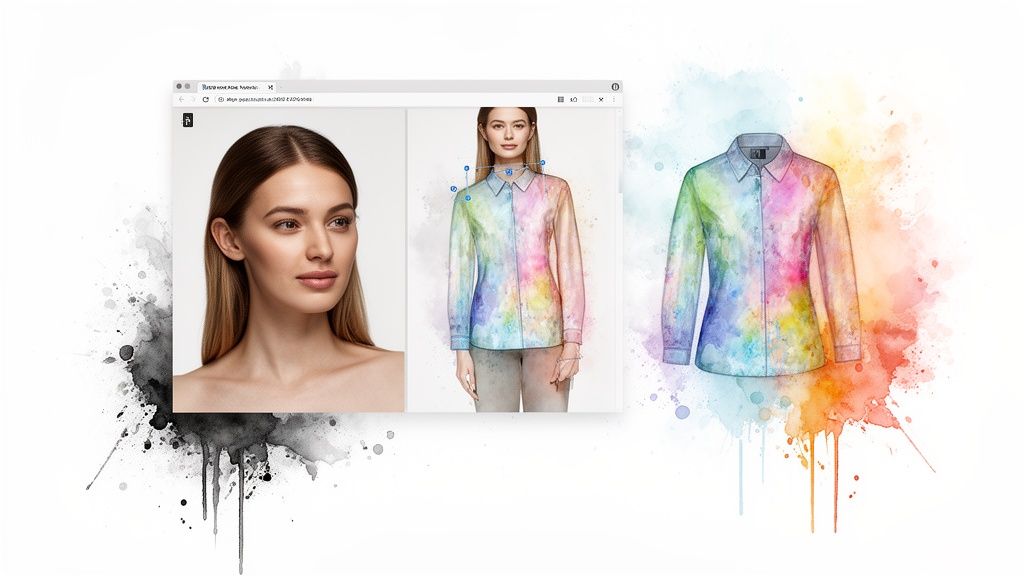
Getting that kind of instant visual feedback is a game-changer for putting together outfits. Think of all the time you'll save and the annoying returns you'll avoid! You can even try on Halloween costumes before you buy.
And this isn't just a niche thing. The AI-powered Chrome extension market is exploding—it's already valued at $3.8 billion and is expected to rocket to $21.6 billion by 2032. Why the massive growth? It’s all driven by tools that make our online lives way more personal and useful. You can dig into these findings on the AI extension market if you're curious.
What is a Chrome extension if not a tool to make your online life better? With AI, that idea is being taken to a whole new level, especially for anyone who loves fashion.
This tech is making shopping faster, more intuitive, and honestly, just a lot more fun. If you're looking for more tools to level up your online shopping game, be sure to check out my guide on other great Chrome extensions for shopping.
Ready to give it a go? The app is free, and the extension works on any site. Try it now at trythisfit.com and start seeing your style come to life in seconds.
Got Questions? I've Got Answers
Let's clear up a few common questions that pop up when people start exploring the world of Chrome extensions. Think of this as your go-to guide for using them with confidence.
"Will Extensions Make My Computer Sluggish?"
That’s the million-dollar question, isn't it? The short answer is: not really, as long as you're mindful.
A single, well-made extension is so lightweight you'll never even notice it's there. The slowdown only happens if you go overboard and install dozens of extensions that are all trying to work in the background at once.
The trick is to be a minimalist. Only keep the extensions you genuinely use and love. It’s just like the apps on your phone—too many running at once will bog things down. Stay lean, and your browser will stay speedy!
"Are All These Extensions Actually Safe?"
For the most part, yes! Anything you find in the official Chrome Web Store has been reviewed. But, just like with anything online, it pays to be a little savvy.
Before you click "Add to Chrome," do a quick check:
- Look at the reviews: What are other people saying?
- Check the user count: A huge number of active users is usually a great sign.
- Review the permissions: This is the big one. If a simple grammar checker wants access to your webcam, that's a major red flag. The permissions should always match what the extension actually does.
"How Can I Tell Which Extensions I Can Trust?"
Trust comes down to transparency. The best developers are crystal clear about what their extension does and why it needs the permissions it asks for.
Take the TryThisFit Chrome extension, for example. The extension asks to access the content on a webpage. Why? So it can "see" the clothing image you right-click on and generate your style preview. The permission directly supports its one and only job.
A trustworthy extension is like a good tool—it does one thing really well without getting into business that isn't its own. It should feel like it's helping you, not watching you.
Keep these simple tips in mind, and you can dive into the amazing world of extensions without a single worry.
Ready to change the way you shop online forever? With TryThisFit, you can see how clothes from literally any store will look on you. Install the free Chrome extension now and bring your style to life.
Try Virtual Try-On Now
See how clothes look on you before you buy - works with any online store
Get Started Free