Professional Image Building: A Practical Step-by-Step Guide

You can have strong work and still get passed over. That's the frustration behind a weak professional image, especially when your résumé is solid, your thinking is sharp, and your online presence doesn't quite tell the same story.
A recruiter glances at your profile. A client checks your site before a call. A hiring manager scans your photo, your headline, and a few lines of bio, then decides whether to keep reading. Professional image building is the discipline of making those signals work for you on purpose, instead of leaving them to chance.
Why Professional Image Building Is Worth Your Attention
I've seen this happen with capable people who did everything “right” on paper. Their ideas were strong, their references were good, and their work quality held up under pressure, yet their image read as vague, inconsistent, or unfinished.
That gap matters because people judge fast. LinkedIn reports cited in the source brief point to profiles with a professional photo receiving up to 21 times more profile views and 36 times more messages than profiles without one, and recruiters spending about 7 seconds scanning a profile before an initial judgment forms (Alex Kaplan Photo). More than 70% of hiring managers in that same source say a professional, well-composed headshot positively shapes their first impression before they read a résumé (Alex Kaplan Photo).
That does not mean polishing yourself into someone fake. It means aligning the signals people already use to sort through candidates, vendors, and collaborators. In practice, image work affects whether someone clicks, replies, invites, or keeps scrolling.
Practical rule: if people keep describing you as capable but hard to place, your image probably needs tightening before your skills need proving.
The best way to treat this is as a measurable, iterative identity process, not a one-time makeover. You define the impression you want, compare it with the one you're currently sending, change the few signals that matter most, then watch how people respond.
That's the lens I use with clients who want more interviews, better client trust, or a cleaner career pivot. It's practical, not theatrical, and it works because it focuses attention where other people make decisions.
Define the Image You Want and Audit the One You Have
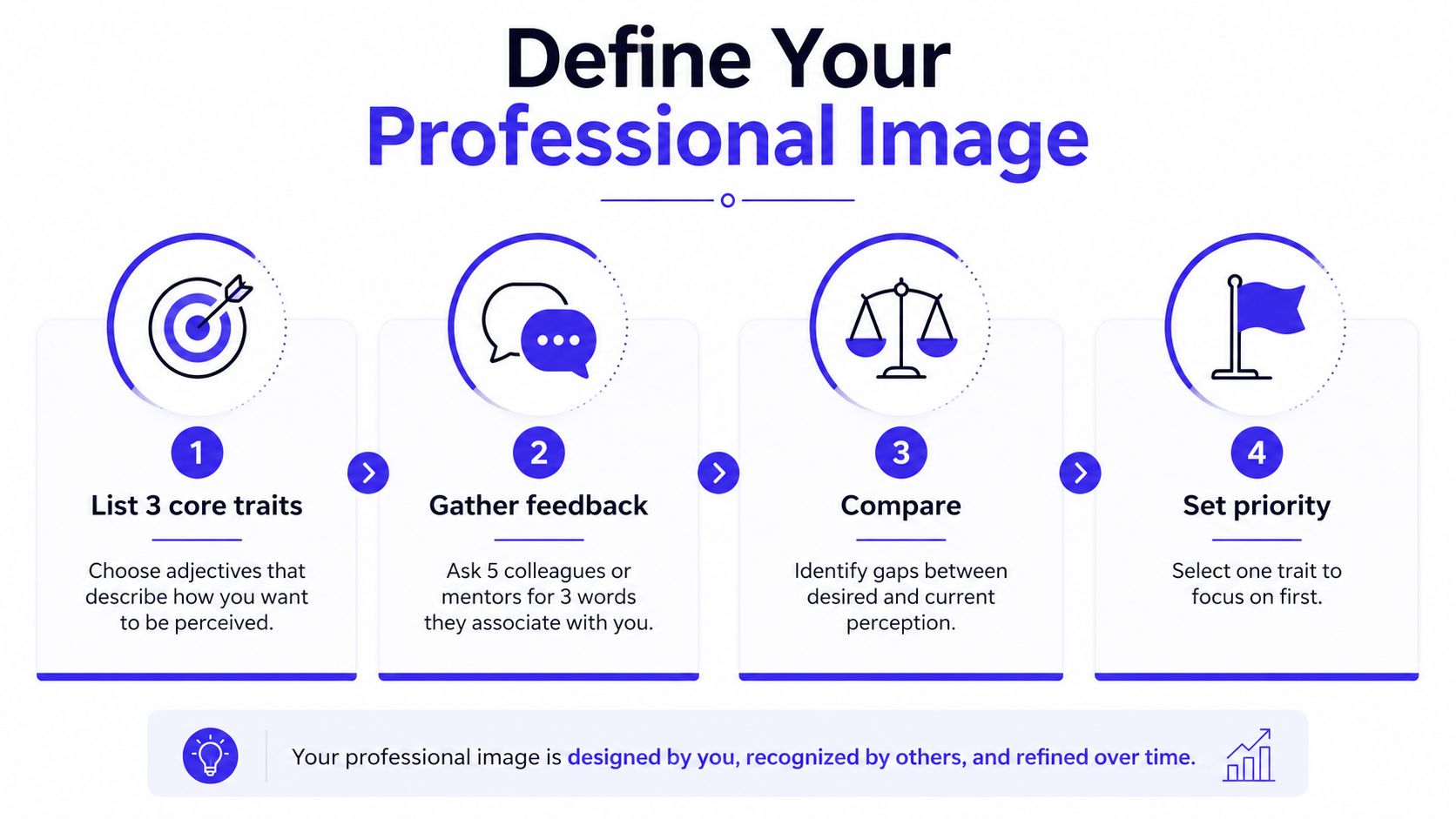
Start with a sentence, not a shopping list. Write the professional image you want in plain language, the way a stranger might describe you after a great first interaction, such as “calm operator,” “strategic communicator,” or “trusted technical lead.”
Then test that sentence against reality. Harvard Business School's guidance on positive professional image emphasizes defining what you want to be associated with, assessing the current perception gap, and weighing the cost and benefit of changing it, because image management can take cognitive, emotional, and physical effort (Harvard Business School Library). APA guidance adds a simple operating model, define the image in one sentence, identify target audiences and channels, differentiate on something clients value, then evaluate and revise (APA Services).
Run a tight perception audit
A two-hour audit is usually enough to find the biggest leaks. Check search results, LinkedIn, your portfolio, public social profiles, and any visible bios, then note where the message drifts or looks outdated. The humanreach framework recommends exactly that kind of audit, then updating the headline and About section with outcome-first language and quantified achievements before maintaining the profile quarterly (The Human Reach).
What to look for: inconsistent titles, outdated photos, bios that sound like three different people, and profiles that never explain outcomes.
The point isn't to fix everything. Choose two or three high-impact signals, usually headline clarity, photo quality, and wardrobe or visual consistency, then leave the rest alone for now. If you want a quick way to align the clothes already in your closet with the image you want, shop your closet and preview combinations before you commit to new purchases.
Prioritize the changes that pay off
A good cost-benefit filter keeps you from turning image work into busywork. If a change takes hours and only slightly improves perception, it probably belongs later. If a change is small, visible, and repeated across channels, it belongs now.
Use this simple order:
- Clarify the headline first: make it say what you do and the value you create.
- Fix the photo next: one image often anchors the whole profile.
- Tighten wardrobe consistency: choose a repeatable visual lane instead of chasing every trend.
- Save deeper reinvention for later: full brand overhauls are rarely the first move.
By the end of this pass, you should know the one image trait to prioritize over the next 30 days. Keep that list short, because short is executable.
Wardrobe and Styling Choices That Reinforce Your Message
Clothing is one of the fastest signals people read, and it can cancel out everything else if it looks off. The right outfit does not need to be expensive, but it does need to support the story you want to tell.
Dress for the message, not the label
If you want to read as a credible expert, choose clean lines, a restrained palette, and pieces that look deliberate. If you want to read as creative, a little more texture or color can help, but the look still needs structure.
That's where browse workwear tailoring from Dandylion Style becomes useful, especially if you're trying to understand how polished clothing is built. The best takeaway isn't “buy more suits,” it's learning which details make a garment look intentional instead of borrowed.
Fit matters more than brand names because it changes the silhouette people see first. Consistency matters too, because when your LinkedIn photo, client meetings, and public events all show a different version of you, the image fragments.
You can test this visually before spending money. Wardrobe essentials is a practical place to start if you want a repeatable base layer, and TryThisFit lets you see how it looks on you before you buy, so you can visualize the style instead of guessing. The app uses flat-lay clothing photos for the most accurate results, and it's especially handy when you're comparing online options from Zara, H&M, Amazon, Shein, Vinted, or Depop via the Chrome extension's right-click feature, which installs in a couple of seconds.
Build a small rotation that works across contexts
I've seen clients waste time chasing novelty when they really needed one dependable visual system. A three-outfit rotation that matches your day-to-day reality will do more for your image than a closet full of “someday” pieces.
Think in terms of use cases:
- For interviews: one outfit that feels calm, current, and not overstyled.
- For client meetings: one look that reads approachable but serious.
- For content or speaking: one outfit with enough character to look memorable on camera.
If you want to preview a suit specifically, add a suit to photo online free can help you visualize the appearance without leaving the page. That's useful when you're deciding whether a sharper look supports the role you're moving toward.
The biggest mistake is overfitting your wardrobe to a fantasy version of your life. If your real work is mostly remote, your clothing choices should still feel credible on video, not just in a boardroom.
Profile Photos, Headshots, and Visual First Impressions
A profile photo does more than look polished. It acts as the first visual signal of whether someone seems competent, approachable, and ready to be trusted.
What a good headshot does
The strongest headshots usually share the same traits across professions. The composition stays simple, the expression looks warm but alert, the background does not compete with the face, and the lighting makes the person look present instead of flattened.
If you want an example of polished, commercially useful framing, the professional headshots by Liz by Design Photography gallery is a helpful reference point. Use it as a visual benchmark for expression and framing, not as a template to copy blindly.
Recruiters and clients move fast, so the photo often carries more weight than people expect, as noted in the earlier discussion of headshot performance by Alex Kaplan Photo. The goal is a headshot that looks like you on your best day, not like a stranger in a rental blazer.
AI headshots have become a real option for some people. One industry report says the global AI headshot and portrait market exceeded $420 million in 2025, was up from $180 million in 2022, and is projected to reach $640 million by 2028 (Proshoot). The same report says professional adoption rose from 8% in 2021 to 58% in 2025, and that the average AI headshot reportedly costs $25 to $35, compared with $150 to $650 for a traditional photographer, while 71% of users cite cost savings as their main reason for choosing AI (Proshoot).
Choose the right option for the job
A photographer still makes sense for a senior executive, a founder in a trust-heavy market, or anyone who needs public-facing materials to feel carefully controlled. AI can be the better move when speed, flexibility, and a lower-cost refresh matter more than a full production process.
The choice usually comes down to three questions:
- How visible is the photo? If it sits on LinkedIn, a website, and pitch decks, image quality matters more.
- How often will you refresh it? A role that changes quickly can justify a cheaper, easier update cycle.
- How formal is your market? Some industries still reward a more traditional look.
If you want to preview how a more formal image reads, the suit preview tool can help you visualize a sharper outfit directly on your own photo. That is useful when you are deciding whether a more customized look supports the role you are moving toward.
<iframe width="100%" style="aspect-ratio: 16 / 9;" src="https://www.youtube.com/embed/qjyw7HTneuY" frameborder="0" allow="autoplay; encrypted-media" allowfullscreen></iframe>The best call is usually the one that keeps your image current without turning maintenance into a project. A good headshot should help people recognize the version of you they are about to meet.
Online Presence and Cross-Channel Consistency
A polished LinkedIn profile can't carry a conflicting website, a casual bio that undercuts your authority, and an email signature that looks like it belongs to someone else. People notice the mismatch fast, even if they don't consciously explain why it feels off.
Make one message travel
APA's guidance is simple, define your image in a single sentence, identify the audiences and channels that matter, then keep the same message and physical elements, including logo, slogan, and colors, consistent year to year (APA Services). That consistency matters because it reduces the chance that a recruiter, client, or peer has to mentally reconcile three different versions of you.
A practical version of this looks like:
- LinkedIn: outcome-first headline, concise About section, current headshot.
- Portfolio or website: short story, proof of results, clear contact path.
- Social bio: lighter tone, same core role and value, fewer details.
- Email signature: name, title, and one stable visual cue.
For a sharper LinkedIn frame, optimize your linkedin profile is a useful reference because it puts profile clarity and positioning in one place. It's most effective when used as a refinement guide, not as a reason to rewrite your whole identity every month.
Keep the promise the same, even if the tone shifts a little by platform.
Write for the channel without losing the thread
A personal site can sound more narrative than LinkedIn. A casual platform like X or Threads can sound lighter and still stay aligned, as long as the core claim stays stable. The goal is not to sound identical everywhere, it's to sound unmistakably like the same person.
The same principle applies to visual identity. If your photo, color choices, and bio style change too much from place to place, people stop seeing a coherent professional picture. That fragmentation is exactly what consistency is supposed to prevent.
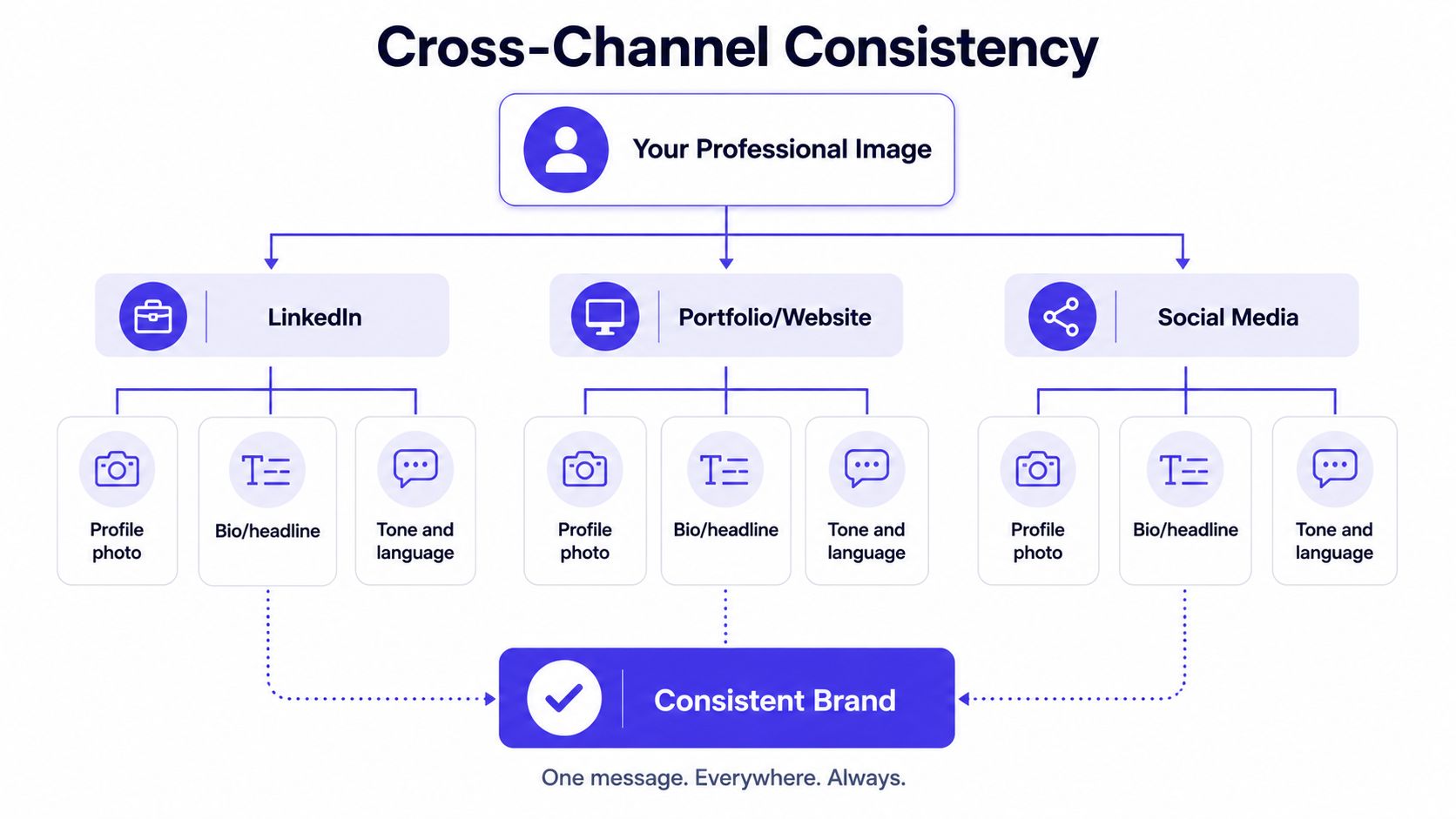
A good test is simple. Open your profiles side by side and ask whether a stranger could describe you the same way after reading each one.
Communication, Etiquette, and Behavior Signals
People do not judge professional image only by clothes and photos. They also read how you enter a room, reply to a message, listen in a meeting, and speak about your own work.
The small behaviors that signal credibility
Indeed's guidance treats first impressions, thoughtful social media use, and punctuality as part of professional image, especially because those signals affect interviews and meetings with new clients (Indeed). UniversalClass adds the behavior layer, dress professionally, shake hands and smile, lean forward slightly to show attentiveness, know your business, and keep monitoring your behavior and other people's perceptions while balancing credibility and confidence (UniversalClass).
That sounds basic, and it is. Basic is what people notice when they're deciding whether to trust you.
A few habits pull the most weight:
- Arrive early enough to settle in: rushed energy shows before you say a word.
- Listen with visible attention: slight forward posture reads as engagement.
- Send a clear recap after meetings: it confirms that you understood the ask.
- Answer emails cleanly: short, direct replies often feel more reliable than long ones.
- Talk about your work accurately: confidence lands better than exaggeration.
If your words say “steady” but your behavior says “disorganized,” people will believe the behavior.
Keep your signals aligned in real time
Video calls make inconsistency easy to spot. A polished bio won't help much if you're distracted on camera, speaking over people, or showing up with no context for your own work.
Treat each interaction like a small proof point. That doesn't mean performing professionalism in a stiff way, it means making the experience of working with you feel easy to trust.
The best professionals I've worked with are usually not the loudest people in the room. They're the ones whose tone, timing, and follow-through match the image they've already built elsewhere.
Measuring Progress and Iterating Your Image Over Time
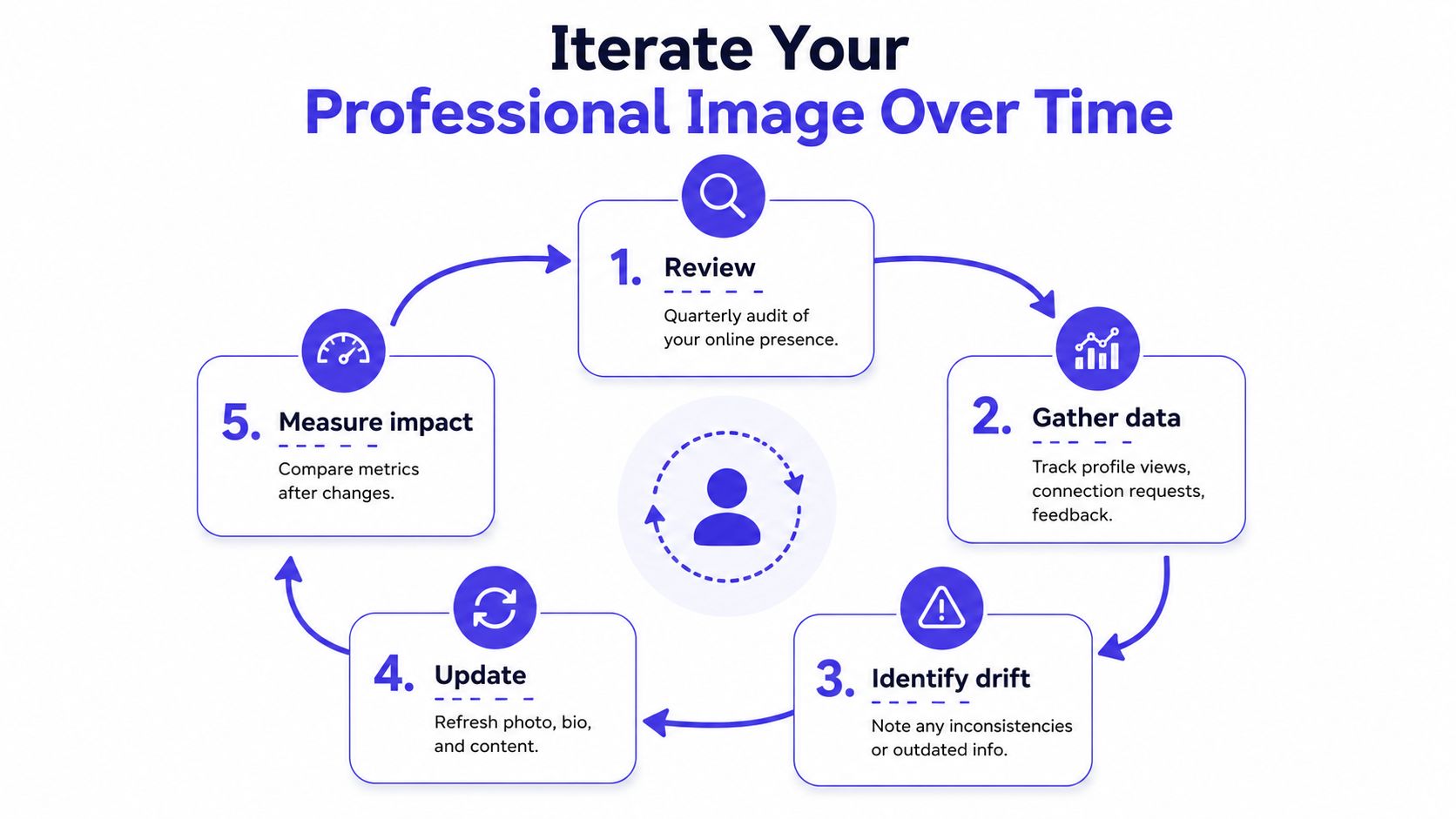
Professional image building drifts if you never revisit it. Your role changes, your audience changes, and the signals that worked last year can start looking stale or incomplete.
Track the signals that matter
The humanreach framework recommends quarterly maintenance of content, endorsements, and profile updates, which is the right rhythm for most professionals who want to stay visible without constantly tinkering (The Human Reach). It also treats credibility as something built from observable proof points, not vague claims.
Watch for a few concrete signals:
- Profile views: useful for spotting whether people are finding you.
- Response rates: useful for seeing whether your message is landing.
- Inbound opportunities: useful for judging whether your image is pulling weight.
- Repeat mentions from clients or peers: useful for hearing what people associate with you.
Don't overread any single metric. A stronger profile photo can raise attention, but the rest of your message still needs to hold up once someone clicks through.
Use a short 30-day plan
Start with one sentence that defines the image you want. Then run the two-hour audit, fix the top three gaps, and set a 90-day check-in to see what changed.
A clean starter plan looks like this:
- Define the sentence: choose the one trait you want associated with your name.
- Audit the public surface: LinkedIn, search, website, and any visible bios.
- Ship the top three fixes: usually the headline, photo, and one consistency issue.
- Collect feedback: ask a few trusted people what changed in their impression.
- Review in 90 days: keep what worked, drop what didn't.
That rhythm keeps the work real. It also stops professional image building from becoming a one-time burst of polish that fades as soon as you get busy again.
TryThisFit lets you see how it looks before you buy, so you can preview outfits, test a sharper visual identity, and make faster decisions about what belongs in your professional image. If you want to visualize your style, compare looks on your own photo, and save time while you build a more deliberate presence, visit TryThisFit and start with an instant try-on.
Try Virtual Try-On Now
See how clothes look on you before you buy - works with any online store
Get Started Free