Your Ultimate Guide to Putting a Photo on Clothes
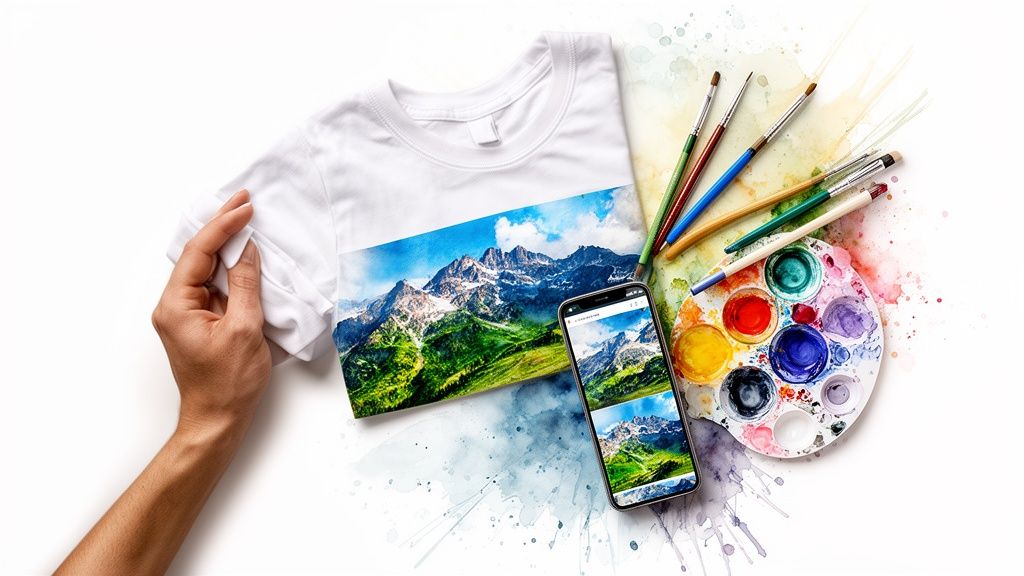
Have you ever looked at a photo and just knew it would be perfect on a t-shirt? You're definitely not alone. Taking a treasured memory, a killer graphic, or a hilarious photo and turning it into wearable art is one of my favorite ways to get creative, and it’s way easier than you might think to put your favorite photo on clothes.
Turn Your Favorite Photos Into Wearable Art
This is about more than just slapping a picture on a shirt. It’s about creating something that is 100% you. Imagine rocking a hoodie with that epic sunset from your last vacation or a t-shirt with your own digital masterpiece. It's the ultimate form of self-expression.
So, how is this all possible? The magic behind it is the booming print-on-demand (POD) industry. This technology lets anyone—and I mean anyone—turn a digital idea into a physical product without having to buy hundreds of them at once. You can make a single custom tee for yourself or a small batch for a family reunion, no problem.
The Massive Trend of Personalization
Honestly, everyone wants stuff that feels personal and unique. It's no surprise the global print-on-demand market is projected to explode in the coming years. This rocket ship growth is all thanks to shoppers who want items that scream "me." And what's the number one product leading the charge? You guessed it: custom t-shirts.
But this desire for the perfect look isn't just about creating new things. It’s also about making smarter choices when shopping online, whether I'm browsing Amazon, Zara, H&M, or hunting for secondhand treasures on Vinted. Being able to visualize how something actually looks on you is a total game-changer.
Visualize Before You Create
In this guide, I’m going to walk you through everything you need to know to create incredible photo apparel. I’ll dive into picking the best printing methods for those rich, vibrant colors and how to prep your photo files like a seasoned pro. Just think of the joy in seeing your kid’s favorite funny moments, like this awesome custom kids monkey selfie T-shirt, come to life.
Best of all, I'll let you in on my secret weapon for seeing exactly how your design will look on you before you spend a dime. Using the TryThisFit app, you can preview the final look on your own body in seconds. It completely removes the guesswork and lets you create with absolute confidence.
My whole goal with TryThisFit was to kill that "I hope this looks good" anxiety. I wanted to be able to see how any photo or clothing style looks on my body instantly, whether I'm designing custom gear or just shopping online.
To get the most accurate preview, I recommend starting with a flat-lay photo of the clothing item. You can upload your images directly on the website or use the super handy Chrome extension that installs in a couple of seconds. It lets you right-click any clothing image you find online to see it on yourself.
Ready to bring your vision to life? Give it a whirl right now at trythisfit.com and see for yourself how easy it is to visualize your perfect style.
Choosing the Right Printing Method for Your Design
Alright, you’ve got your photo picked out and you're ready to make something awesome. Now for the most critical decision: how are you actually going to get that image onto the fabric? This choice is a huge deal—it affects everything from the final look and feel to how long your custom creation will last.
Let's break down the most popular ways to do it, so you can pick the perfect match for your vision.
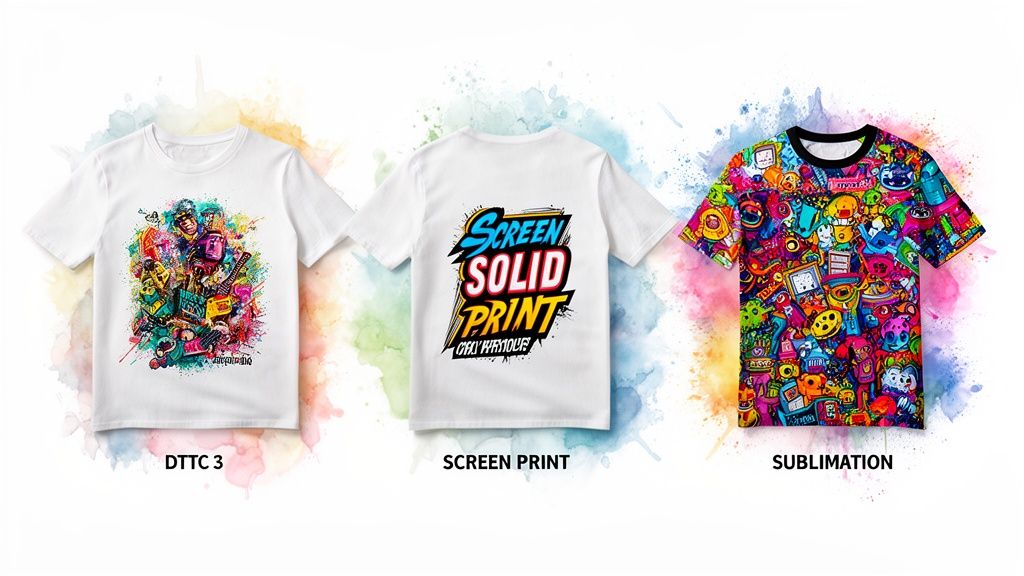
Think of these printing techniques like different tools in a workshop. You wouldn't use a sledgehammer for a delicate sculpture, right? The same logic applies here.
Direct-to-Garment (DTG) for Detailed Photos
For stunningly complex and colorful photos, my personal favorite is Direct-to-Garment (DTG). Imagine a super-sophisticated inkjet printer, but instead of paper, it prints directly onto your shirt. The ink soaks right into the cotton fibers, which means the design feels incredibly soft and breathable—you can barely feel it’s there.
This method is the undisputed champ for photorealistic images. It nails every gradient, subtle shadow, and tiny detail in your picture. If you're printing just one t-shirt with that gorgeous sunset photo from your vacation, DTG is almost always the answer.
Screen Printing for Bold and Durable Graphics
Screen printing is the old-school, tried-and-true workhorse of the apparel world. It involves pushing thick, vibrant ink through a custom stencil onto the garment. This process creates a design that sits slightly on top of the fabric, giving it a classic, professional feel and making it unbelievably durable.
This is your go-to for designs with just a few solid colors—think band logos or company branding. The big win for screen printing is its cost-effectiveness in bulk. If you’re outfitting an entire team or making merch for an event, nothing beats it. Just keep in mind that the intensive setup makes it pricey for a one-off item.
For a single, intricate photo on clothes, DTG is your best friend. For a big batch of bold, simple designs where durability is key, screen printing reigns supreme.
Heat Transfer for DIY Creations
Feeling crafty? If you want to take matters into your own hands, heat transfer is a fantastic and super accessible option. It's as simple as printing your photo onto special transfer paper and then using a heat source—like a regular household iron or a dedicated heat press—to apply it to your shirt.
This is hands-down the quickest and cheapest way to make a single custom piece right from your desk. The final quality and durability can vary, but it offers total creative freedom and is a perfect way to experiment without a big upfront cost.
Want to see how your design will look before you commit? Get an instant preview of your style! Try it now at trythisfit.com to visualize your idea in seconds.
Sublimation for Ultra-Vibrant Synthetics
Sublimation is where true printing magic happens, especially on polyester fabrics. The science is just plain cool: the process turns solid ink directly into a gas, which then permanently fuses with the fabric fibers. The design literally becomes part of the material, so you can't feel it at all.
The results are breathtakingly vibrant, and the image will never crack, peel, or fade. The only catch? Sublimation works its magic best on light-colored, polyester or poly-blend garments. For athletic wear or an all-over-print hoodie, this technique delivers the most brilliant and permanent finish you can get. If you want to dive deeper into the technical side, you can learn more about sublimation printing on fabric.
How to Prepare Your Photo for a Perfect Print
Alright, let's talk about the single most important part of creating an amazing photo-on-clothes design: the file itself. A fantastic print starts with a high-quality digital photo. You can't just pull a fuzzy picture from your social media feed and hope for the best—it just doesn't work that way.
Getting your image prepped and ready for its big debut is where the magic happens. So, let's get your file ready for a flawless print.
Nail the Resolution
First things first, and trust me, this is non-negotiable: resolution. To get a sharp, clear image on fabric, you absolutely need a high-resolution photo. The gold standard in the printing world is 300 DPI (dots per inch) at the final size you want it printed. A low-resolution photo is a one-way ticket to a blurry, pixelated mess.
Here’s a quick way to check this on your computer. On a Mac, just open your image in Preview, head to Tools > Adjust Size, and check the "Resolution" number. On Windows, right-click the file, go to Properties > Details, and you'll find the dimensions and DPI. Taking two seconds to do this can save you from a lot of heartache.
Choose the Right File Format
Next up, file formats. This is simpler than it sounds! If you want your image to stand out on its own—without a big colored box around it—a PNG file with a transparent background is your absolute best friend. This is perfect for a cool portrait, a logo, or any design where you want the shirt's fabric to peek through.
On the other hand, if your photo is a beautiful rectangle, like a stunning landscape, a high-quality JPEG will work just fine. Just make sure you save it at the highest possible quality setting to keep all those juicy details intact. For a deeper dive into getting your images looking professional, check out our guide on perfecting your clothes product photography.
A Final Polish for Color and Pop
Ever notice how colors look super vibrant on your phone screen but a little different in print? That's because screens use an RGB (light-based) color model, while printers use a CMYK (ink-based) model. You don't need to be a graphic design pro, but just knowing this helps manage expectations.
Sometimes, a simple brightness or contrast boost in a basic photo editor can make a huge difference. It helps your design really pop off the fabric instead of looking flat. This whole trend of custom photo apparel is absolutely exploding. As online shopping on sites like Amazon and Shein keeps growing, people want to know exactly what they’re buying. You can get more awesome stats about this expanding photo printing market on futuremarketinsights.com.
I've seen thousands of designs, and the ones that always win are clear, bright, and simple. Don't overthink it! A single, well-chosen, high-quality photo will always have more impact than a cluttered, low-res design.
Before you send that file to the printer, why not see exactly how it’s going to look? Once your photo is ready, pop it onto a blank t-shirt template using a tool like Canva. Then, the fun part: head over to trythisfit.com, upload your mockup, and get an instant preview of how that shirt will look on you.
This step is a total game-changer for nailing the placement and style before you commit. You can install the Chrome extension in 5 seconds and start visualizing designs from any online store.
See Your Design on You Before You Print a Thing
This is my absolute favorite part of the process. Before you spend a dime printing that custom t-shirt or hoodie, what if you could see exactly how it’s going to look on your own body? This is where a little bit of tech magic comes in, and it's a tool I actually built to solve this exact problem: TryThisFit.
Think of it as your personal design-preview mirror. You just need two things: a photo of yourself and a flat-lay picture of the blank shirt or sweater you want to customize. Upload both to trythisfit.com, and in just a few seconds, you'll see a virtual try-on of you "wearing" the blank garment. It's incredibly simple and fast, with no accounts needed.
The Real Trick: Previewing the Final Product
But here’s where we get really clever. Open up a simple photo editor—I use Canva for this, but even Instagram's story editor works—and place your prepared photo design onto the image of the blank shirt. Save that new image as a complete mockup.
Now, take that mockup file and upload it to TryThisFit along with your picture. Instantly, you’ll get a preview of what your finished photo on clothes creation will actually look like on you. This simple step is a lifesaver for getting the placement perfect and avoiding that "darn, I wish I'd made it smaller" moment.
You can play around with different photo sizes on your mockup, shift the design up or down, and see what truly works from a real-world perspective. You don't need an account, your data is not stored, and it’s unbelievably quick. It's the best way I know to make design decisions with total confidence.
Want to give it a spin? You can try it right now at trythisfit.com and make sure you're 100% happy with your design before it ever goes to the printer.
How Does It Work?
I designed the app to use AI to analyze the shape of the clothing in a flat-lay photo and then realistically wrap and drape it onto your body from your own picture. It's important to know this isn't for checking the fit or size—you’ll still want to rely on the store's size chart for that.
This is all about visualizing the style. Is the color right for you? Is the photo positioned well? Does the whole thing have the vibe you were hoping for? I’ve used this for all sorts of projects, from testing out a goofy Halloween costume idea to designing custom shirts for a family reunion.
It’s especially helpful when I'm browsing for blank apparel on sites like Amazon, where I can grab a product image and immediately see if it's the right canvas for my idea. To make this work, your photo file needs to be prepped correctly. It’s not complicated, and this infographic breaks down the three key things to check.
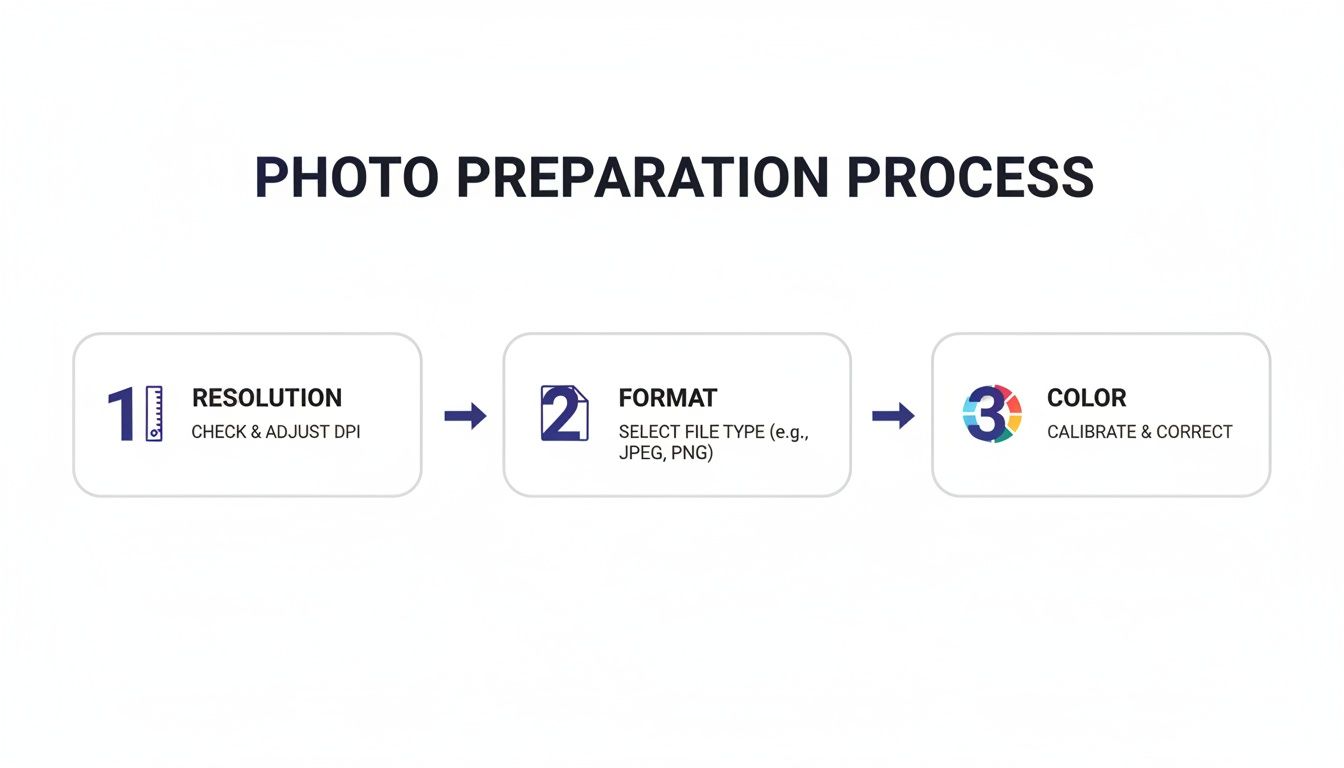
As you can see, it all comes down to making sure you have a high-resolution image, choosing the right file type, and giving the colors a final check before you save.
A Simple Workflow for a Perfect Preview
Once you get the hang of it, this entire process takes just a few minutes. It completely removes the guesswork and lets you focus on the fun part: creating something awesome that saves time and avoids returns.
Here’s the workflow I use:
- Find Your Canvas: First, I find a blank t-shirt or hoodie online that I like. I always look for a clean, flat-lay product photo without any models.
- Create the Mockup: Next, I use an editor to pop my prepared photo design right onto the shirt image and save it.
- Visualize It: Then I head over to trythisfit.com, upload my mockup and a photo of myself, and get that instant virtual try-on.
- Tweak and Repeat: If the placement feels off, I just jump back to the editor, adjust it, save, and re-upload. I can test a dozen ideas in a couple of minutes until it’s absolutely perfect.
This approach is fantastic for anyone wanting to make custom gear. If you're interested in using this for regular shopping, you might also like the guide on how to try clothes online before you buy.
Honestly, the most rewarding part of building this tool is seeing people bring their ideas to life without any second-guessing. Visualizing your photo on clothes beforehand turns the whole creative process from a gamble into a guaranteed win.
Your masterpiece is just a few clicks away from being visualized. Grab your photo, find a blank tee, and see your vision come to life. You can even install the Chrome extension in 5 seconds to make the process even faster.
Instantly See Any Blank Tee On You With This Chrome Trick
Ever find yourself scrolling for hours, trying to find the perfect blank canvas for your next custom project? You’re browsing Amazon, H&M, or even a secondhand gem on Vinted, and you spot a shirt that could be the one. The big question is, will the style actually look good on you?
This is where my absolute favorite design hack comes in: the TryThisFit Chrome extension. Forget the guesswork. This little tool is a game-changer for anyone making photo on clothes apparel, letting you visualize the appearance in seconds, right from the store's website. It installs in a couple of seconds and works on any site.
My Go-To Workflow for Finding the Perfect Garment
Here’s how I use it. Let’s say I find a promising blank hoodie on a retail site like Zara, H&M, Shein, or Depop. Instead of getting lost in a dozen open tabs downloading images, I just right-click on the product photo and hit 'Try This Fit'. Bam! The app instantly shows me what that hoodie’s cut and color looks like on my body shape.
This completely transforms the hunt for the right garment. You know if the style works before you even start thinking about your photo placement. It's a fantastic way to find your style and decide what to wear.
Once I have that virtual try-on, I'll take a quick screenshot. That becomes my working canvas. I can drop my design onto it, see how it looks, and then upload that final mockup to the TryThisFit web app to get the ultimate preview of the finished piece on myself. For more ways to supercharge your online shopping, you should definitely check out the guide to the best Chrome extensions for shopping.
A Must-Have for Creatives and Style Planners
I can't tell you how useful this is for all kinds of projects. It’s perfect for fashion lovers wanting to experiment with a new silhouette, but it’s also a lifesaver for practical planning. Need to coordinate matching shirts for a family reunion? Or maybe you're piecing together an epic Halloween costume from five different online stores. This extension lets you see how all those different items actually come together.
The whole idea behind the Chrome extension was to make style visualization seamless. You shouldn't have to break your shopping flow to see if something works for you. A right-click should be all it takes.
By previewing your photo on clothes designs this way, you’re not just making cool stuff—you're making smarter and more confident choices. It’s all about feeling empowered in your creative process. No more wondering if that specific cut or color will work for your vision. Now you can see it for yourself, instantly.
Ready to completely change how you design custom apparel? Install the free TryThisFit Chrome extension in seconds and start bringing your ideas to life. Trust me, your next brilliant design is just a right-click away.
How to Care for Your Custom Photo Apparel
So, your custom photo apparel has arrived, and it looks incredible! The last thing you want is for that vibrant design to fade or crack after a few washes. Let’s talk about how to keep your new favorite piece looking brand new.
Honestly, it’s not hard, but it does require a little mindfulness. The golden rule? Always wash your garment inside out and in cold water. I can't stress this enough. Turning it inside out protects that beautiful print from rubbing against other items in the wash.
Washing and Drying Like a Pro
Once you've got it turned inside out, you're ready to wash. Here are the keys to success:
- Gentle Detergent is Your Friend: Grab a mild detergent. You’ll want to steer completely clear of anything with bleach or aggressive fabric softeners, as these harsh chemicals can literally eat away at the inks.
- Air Dry for the Win: When it comes to drying, air drying is your best bet, hands down. Just lay the garment flat or hang it up, preferably out of direct, harsh sunlight.
- If You Must Machine Dry...: In a pinch? Tumble dry on the absolute lowest heat setting you've got. High heat is the fastest way to destroy a custom print, causing it to crack, peel, or warp. Trust me, it’s worth the extra few minutes.
Think of it this way: you wouldn't put a piece of art in a hot oven. Treat your custom print with the same care, and it'll thank you by staying vibrant for years.
The Deal with Ironing and Long-Term Care
Got a few wrinkles to smooth out? No problem, but whatever you do, never iron directly on top of the photo design. The intense heat from an iron will melt the print in seconds, and there’s no coming back from that.
The safe way to do it is to turn the garment inside out and iron on a low setting, carefully avoiding the design area. For extra peace of mind, I like to place a thin piece of cloth over the back of the print area before ironing. Following these simple habits will ensure your custom photo on clothes stays perfect.
Your Top Questions About Photo Apparel, Answered
As you start putting photos on clothes, a few questions always pop up. I get them all the time! Let's walk through some of the big ones so you can get incredible, professional-looking results right from the start.
What Kind of Photo Gives the Best Results on a Shirt?
This is probably the most important question. For a sharp, professional-looking print, your photo has to be high-resolution. Trust me on this. I always tell people to aim for 300 DPI (dots per inch) at the actual size you want to print. If you go lower, you’re gambling with a blurry, pixelated mess.
File type matters, too! If you’re printing a design with a custom shape—like just a person or an object with no background—a PNG file with a transparent background is your best friend. For a standard rectangular photo, like a gorgeous landscape, a high-quality JPEG works just fine.
How Can I See My Design on a Real Shirt from Zara or H&M?
Oh, this is the fun part! You can absolutely do this, and it's a total game-changer. The slickest way is with the TryThisFit Chrome extension, which installs in a couple of seconds.
Just cruise over to a store's website like Zara or H&M and find a shirt you like, preferably on a "flat lay" (laid out flat) photo. Right-click the image, and you can instantly see how that blank tee would look on your own body. From there, you can screenshot it, mock up your photo design on top, and then upload that to the main app to see the final creation on yourself.
Does the TryThisFit App Help Me Figure Out My Size?
Great question, as it's a common point of confusion! The app is really all about visualizing the style and appearance of your creation. It’s perfect for checking the placement of your photo, seeing how the colors pop, and just getting a feel for the overall vibe before you commit.
However, the app does not determine sizing or measurements. For the actual fit, you'll always want to double-check the retailer's official size chart.
I wanted to help you see how it looks, so you can feel confident in your design. For how it fits, the brand's measurements are always your best guide.
How Do I Keep My Printed Photo from Fading?
You've made a masterpiece, now you want it to last! Proper care is everything. My number one rule is to always wash your garment inside out, in cold water, and use a mild detergent. Stay far away from bleach or harsh fabric softeners—they're the enemy of a good print.
When it's time to dry, letting it air dry is the gold standard. If you have to use a machine, use the absolute lowest heat setting possible. And never, ever iron directly on the printed photo! If you need to get wrinkles out, flip the shirt inside out first.
Ready to stop wondering and start seeing? With the TryThisFit app, you can see exactly how your incredible designs will look on you in seconds. No sign-ups, no fuss—just pure creative power. Try it now at trythisfit.com and bring your vision to life.
Try Virtual Try-On Now
See how clothes look on you before you buy - works with any online store
Get Started Free